Five ways TIP saves you money · 2 of 5 · Billing errors
2
What your contract promised and the bill left out
The discount that ended early, the rate that never stepped down, the credit that was owed and never showed. Nothing on the bill looks wrong.
Dedicated internet
Contract says$1,500.00
Bill says$2,100.00
$600 over, every monthNext invoice
Dedicated internet$1,500.00
Credit-$600.00
Matches your contract
From a contract's promise to the right bill
The TIP Contract Intelligence Module
at onboardingContract readevery term that moves a price or a date
at onboardingTerms approvedbefore anything is priced
every billExpected bill pricedwhat each bill should have been
Your partYou see the differencewith the clause beside it
day 2Disputedfiled and followed like any billing error
next statementProventhe credit checked on a later bill
Nothing on the bill looks wrong. The contract says otherwise.
What TIP does
TIP reads every term in the contract that moves a price or a date, works out what each bill should have been, and treats every difference as a billing error, with the clause beside it.
Where you see it in TIP
Contract Briefing
Your part
See what the bill should have been.
back on your bill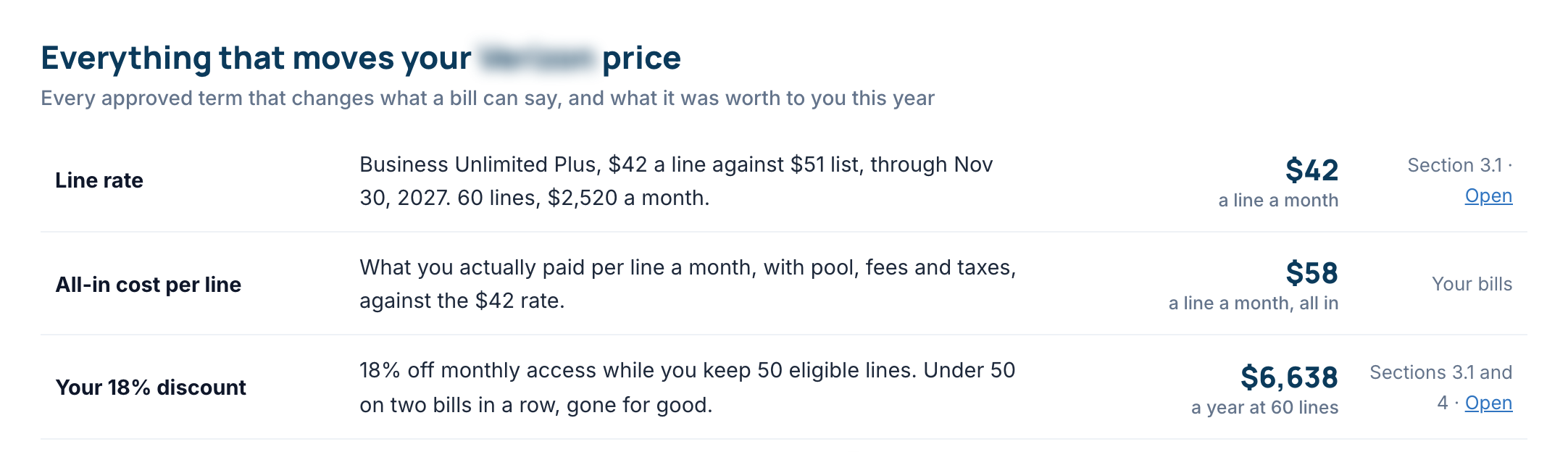
Nothing on the bill looks wrong.
The TIP Contract Intelligence Module reads every term in your contracts that moves a price or a date. So TIP knows what each bill should have been.
The discount that ended early
The rate that never stepped down
The credit that was owed and never showed
See TIP on your kind of bills.
Thanks. TIP will reply within one business day with times for a 30-minute call.